

Overview
Character: A content creator specializing in YouTube video production and using AI to create stock images for sale on Adobe Stock.
Brand: No specific brand, focused on a 9×16 format stock image portfolio (suitable for iPhone wallpapers).
Implementation Timeline:
- Started selling stock images on Adobe Stock over a year before the video (before September 2024)
- Original video (September 9, 2024): Reported revenue from top 5 images
- Update video (January 8, 2025): Updated revenue from old images and 4 new images posted in the last 60 days
Market: International stock photography market, targeting image buyers on Adobe Stock for purposes like design, advertising, or digital content.
Revenue Model
Primary Revenue Source: Selling stock images on Adobe Stock, with each download earning an average of $0.33–$0.64, depending on license type.
How AI Generates Revenue:
- Using AI tools like MidJourney to create 9×16 format images with diverse themes (landscapes, nature, abstract, characters)
- Automating processes with AI: image creation, tagging, titling, and metadata optimization to increase searchability on Adobe Stock
- Leveraging market trends (e.g., wallpaper-style images) to create high-demand content
Revenue Details (as of January 8, 2025):
Old Images (reported September 2024):
- Image 1 (top performer): $279.52 (9/2024) + $36.12 (4 months later) = $315.64
- Image 2: $128.76 + $13.24 = $142.00
- Image 4 (lowest): $55.62 + $0.64 (2 downloads) = $56.26
New Images (posted within 60 days, 12/2024–1/2025):
- Image 1 (strawberry): $9.77 (posted 2/12/2024, ~60 days)
- Image 2: $7.35 (posted 19/12/2024, ~45 days)
- Image 3: $1.26 (posted 27/12/2024, ~30 days)
- Image 4 (warrior, lowest): $0.33 (posted 13/1/2025, ~15 days)
Total Revenue: Not disclosed in full, but creator reports daily earnings for over a year, with hundreds of images generating revenue in the last 60 days.
AI Tools and Technology Used
MidJourney:
Function: Creates high-quality stock images based on text prompts, focusing on 9×16 format
Advantages: Generates diverse images (landscapes, abstract, characters) at low cost (~$15/month for basic plan)
AI Automation Tools (not specifically named, but possibly includes Make.com or similar):
Function: Automatically tags, titles, and optimizes metadata for images to increase searchability
Advantages: Reduces manual effort, allows processing hundreds of images daily
Supporting Technology:
- Adobe Stock Contributor Portal: Platform for uploading, managing, and tracking revenue
- AI Upscaling Tools (suggested: Topaz Gigapixel AI): Increases image resolution to meet Adobe Stock minimum requirements (4–100 MP)
Implementation Process
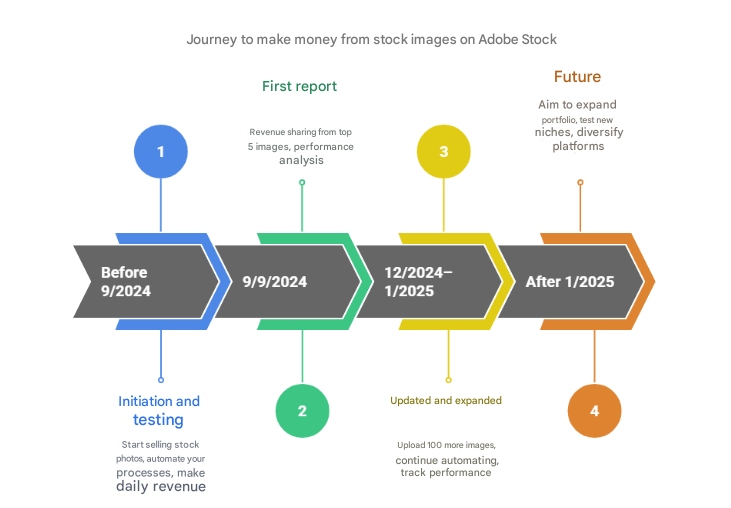
Phase 1: Start and Experimentation (before 9/2024):
- Creator began selling stock images on Adobe Stock over a year prior, focusing on 9×16 format after recognizing wallpaper trend potential
- Used MidJourney to create images with themes like nature, landscapes, and abstract, avoiding “iPhone wallpaper” tags to comply with Adobe Stock policies
- Automated tagging and titling processes with AI to optimize time and increase searchability
- Achieved daily revenue after few months, with images like Image 1 ($279.52 in 9/2024) becoming top performers
Phase 2: First Report (September 9, 2024):
- Published revenue from top 5 images in video “How Much Passive Income I Made Selling Stock Photography Wallpapers on Adobe Stock”
- Detailed analysis: Identified prompts, posting times, and performance of each image to recreate similar images (protecting original account)
- Observed some images achieved high revenue ($279.52), while others only reached $55.62
Phase 3: Update and Expansion (12/2024–1/2025):
- Posted ~100 new images in 60 days, with some generating immediate revenue (e.g., $9.77 for strawberry image)
- Continued using AI automation to create and upload hundreds of images, optimizing workflow to reduce manual effort
- Performance monitoring: Some old images decreased in revenue (e.g., Image 4 only earned $0.64 in 4 months), while new images showed growth potential
- Faced increased competition as many people copied the strategy after watching the video (video reached ~3,400 views)
Phase 4: Future (after 1/2025):
- Goal to build portfolio of tens or hundreds of thousands of images to increase revenue opportunities
- Continue experimenting with new niches and optimizing prompts to meet market demands
- Explore additional stock platforms (Freepik, 123RF, Dreamstime) to diversify revenue sources
Results Achieved
Revenue: Old Images (as of January 8, 2025):
- Image 1: $315.64 (~950 downloads, assuming $0.33/download)
- Image 2: $142.00 (~430 downloads)
- Image 4: $56.26 (~170 downloads)
New Images (60 days):
- Image 1: $9.77 (~30 downloads)
- Image 2: $7.35 (~22 downloads)
- Image 3: $1.26 (~4 downloads)
- Image 4: $0.33 (1 download)
Total: Hundreds of images generating revenue, with daily earnings for over a year. Total revenue not disclosed, but top image ($315.64) already covered MidJourney costs (~$15/month).
Other Achievements:
- Built efficient automation workflow, allowing processing of hundreds of images with minimal effort
- Created YouTube community following, with video reaching ~3,400 views, inspiring newcomers
- Developed “virtual real estate” mindset: viewing each image as digital asset generating passive income
Strategy Highlights:
- AI Image Generation: Creating 9×16 images aligned with market trends
- Automation: Automated tagging, titling, and uploading to optimize time
- Niche Targeting: Focusing on high-demand themes (landscapes, abstract, characters)
Analysis and Lessons Learned
Success Factors:
AI Automation: Using MidJourney and automation tools to create and upload hundreds of images, reducing time and effort costs
Long-term Thinking: Creator doesn’t expect large revenue from single image, but focuses on building large portfolio to increase sales opportunities
Market Understanding: Focusing on 9×16 format (wallpaper-suitable) and optimizing metadata to increase searchability
Creative Innovations:
- Combined AI automation with “virtual real estate” strategy, viewing each image as digital asset generating passive income, similar to real estate but much lower cost (~$15–$50/month)
- Recreated similar images to protect original account while sharing knowledge via YouTube to build community and credibility
- Experimented with new niches (e.g., strawberry, warrior) to diversify portfolio and reduce risk of depending on single theme
Challenges and Solutions:
Increased Competition: YouTube video (3,400 views) attracted many copycats, reducing revenue from some images (e.g., Image 4 only earned $0.64 in 4 months). Solution: Continue uploading new images and experimenting with different niches
Inconsistent Performance: Some images achieved high revenue ($315.64), while others only earned $0.33. Solution: Maintain “cast a net” mindset, accepting that not all images will succeed
Lack of Analytics Data: Adobe Stock doesn’t provide detailed demand or trend information. Solution: Rely on experimentation and revenue feedback to adjust prompts and niches
Key Lessons:
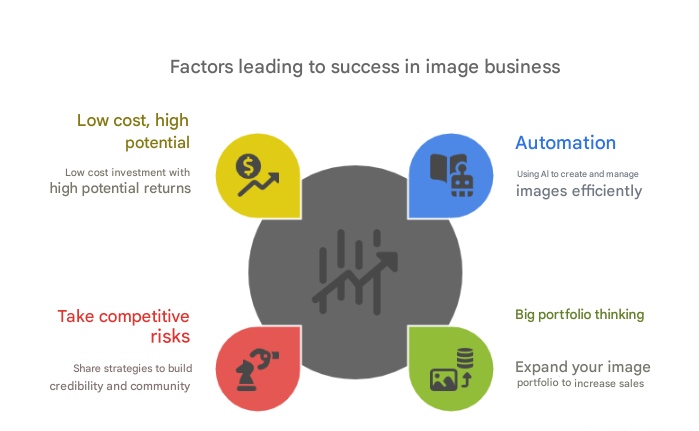
Automation is Key: Using AI to create, tag, and upload images saves time and enables easy scaling
Large Portfolio Mindset: More images increase revenue opportunities. A portfolio of tens of thousands of images can create stable income
Accept Competition Risk: Publicly sharing strategy (via YouTube) may increase competition but also builds credibility and community
Low Cost, High Potential: With costs of ~$15–$50/month (MidJourney, automation tools), this model suits beginners
Tips for Beginners
- Start with AI tools like MidJourney (~$15/month) to create high-quality stock images
- Use automation tools (like Make.com, ~$10–$20/month) to automate tagging and uploading
- Register Adobe Stock Contributor account (free) and research trends on Adobe Stock Insights
- Create diverse portfolio (landscapes, abstract, characters) and upload consistently (10–20 images/week)
- Starting cost: ~$25–$70/month (AI tools, hosting, automation)
Sources and Links
Original Source: YouTube video “I Used AI Automation To Make: $ On Adobe Stock!” (January 8, 2025)